
Usage
Run wiregram with no arguments in an interactive terminal. The footer shows the keys for the current screen; Keybinds and wiregram -h list all of them.
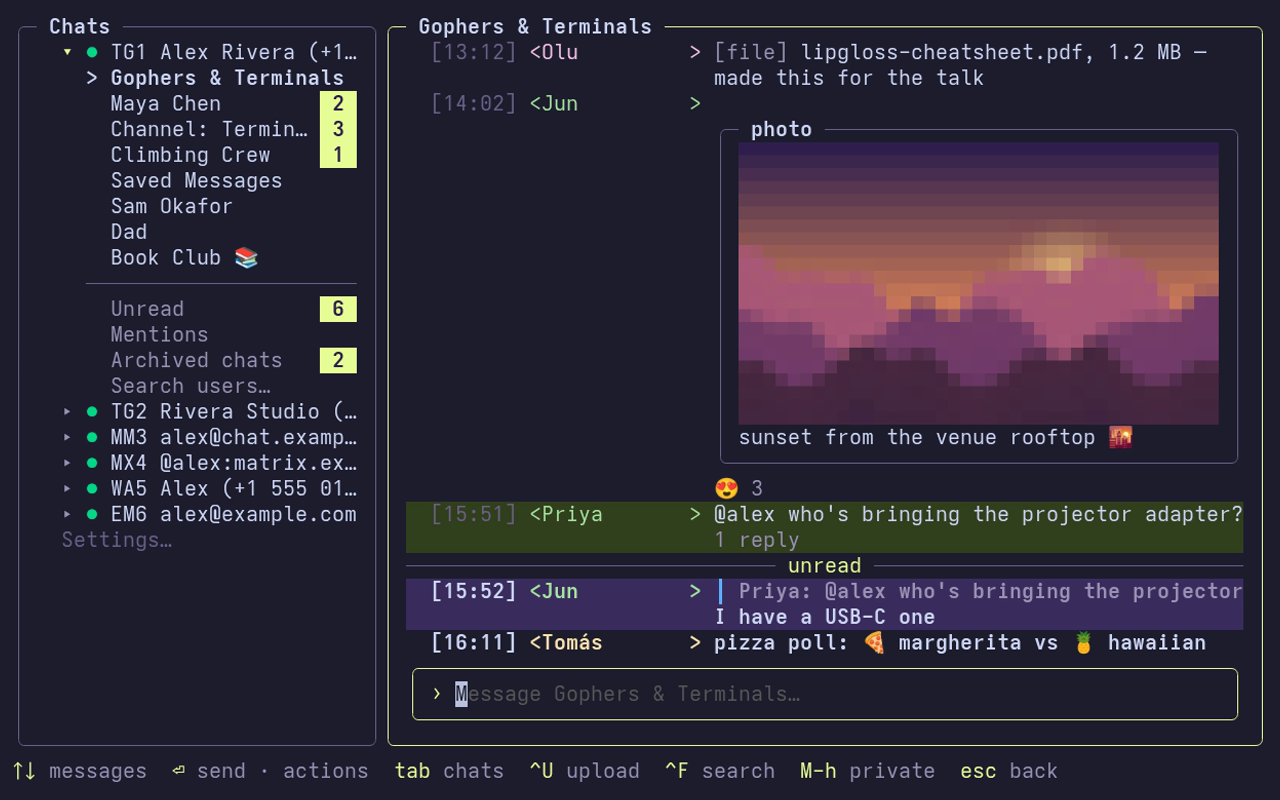
Screens
- Splash. The logo shows for about a second.
- Account chooser. Every account with its status, then Chat Agents, Settings…, Add account and Quit. Under them sits the unread digest and any plugin widgets.
- Chat mode. The chat list and the open chat. Inside an account the screen is the body and a footer with the keys for what has focus; notices show on the right of the footer.
- Settings. Opened from the chooser's
Settings…row or the sidebar's last row. See Configuration. - Agents mode. Alt+A switches to Chat Agents, drawn in violet.
Layout
Terminals 100 columns wide or wider show the chat list as a sidebar beside the open chat; Tab moves focus between them. Narrower terminals show one pane at a time.
The sidebar is an account tree. Every account is a row with an arrow, a status glyph, a tag such as TG1 (backend and position) and its label. The active account is expanded to its chats, Unread, Mentions and Search…. Enter on another account switches to it. The last row opens Settings.
Chat text wraps at 120 columns or the terminal width, whichever is smaller.
Mouse
- The wheel moves the selection of the list under the pointer, as ↑/↓ would, without moving focus. Over the thread pane it scrolls the thread.
- A click on a chat, account, card, menu row or picker entry opens it, as Enter would.
- A click on a message selects it; a right click opens its actions.
- A click on an attachment (the image or the
[tag]row) downloads it and opens it withxdg-open(openon macOS). - Hold Shift while dragging to select text with the terminal.
The login and connecting screens leave the mouse to the terminal.
Modals
Questions and pickers open as modals over the screen, with everything behind them faded:
- Confirmations. Quitting, deleting a chat, message, agent or provider, removing an account and Reset ask first. y or Enter on the action goes ahead, Esc cancels. Deletes and Reset start on Cancel.
- Search users, Forward to and Mention share one picker: type to filter, Enter to pick.
- Message actions open with Enter on an empty composer or a right click. See Chats.
- Account connected. A new account opens with a card listing the keys to get around and search; any key or click closes it.
Inactivity lock
Telegram accounts lock the open chat after a spell of inactivity, hiding its messages. Any key unlocks it. Alt+H toggles private mode, which hides the history on demand.