
Games
Challenge someone in a chat to a two-player game, played in a pane beside the chat. The games are small Lua scripts built into wiregram:
| Game | How it plays |
|---|---|
| Battleship | Both place a fleet of five ships (arrows, r rotates, Enter places, a places the rest at random), seeing only their own; then you fire in turn at the other's waters. Sink the whole fleet to win |
| Chess | Move the cursor with the arrows, Enter picks up a piece and shows where it can go, Enter again on a square moves it (on the piece itself, or Backspace, puts it down). A pawn reaching the last rank asks q r b n. Checkmate wins and stalemate draws; there is no draw by repetition or the fifty-move rule. The challenger plays white, and each of you sees your own pieces at the bottom |
| Connect Four | Drop discs from the top (←/→ or 1–7, then Enter); four in a row wins |
| Pong | First to 5 points; ↑/↓ or w/s |
| Snake | Two snakes on one field, the challenger's green and the other blue. Turn with the arrows or w a s d and eat to grow; hitting a wall, yourself or the other snake loses the round, and if both crash at once the longer snake takes it. First to 3 rounds |
| Tic-tac-toe | Three in a row |
The challenger moves (or fires) first. In Battleship each player's wiregram shows only their own fleet, though the challenger's wiregram, which runs the game, holds both.
Playing
In a private chat or a group, click game+ at the end of the input, or press Alt+G, and pick a game.
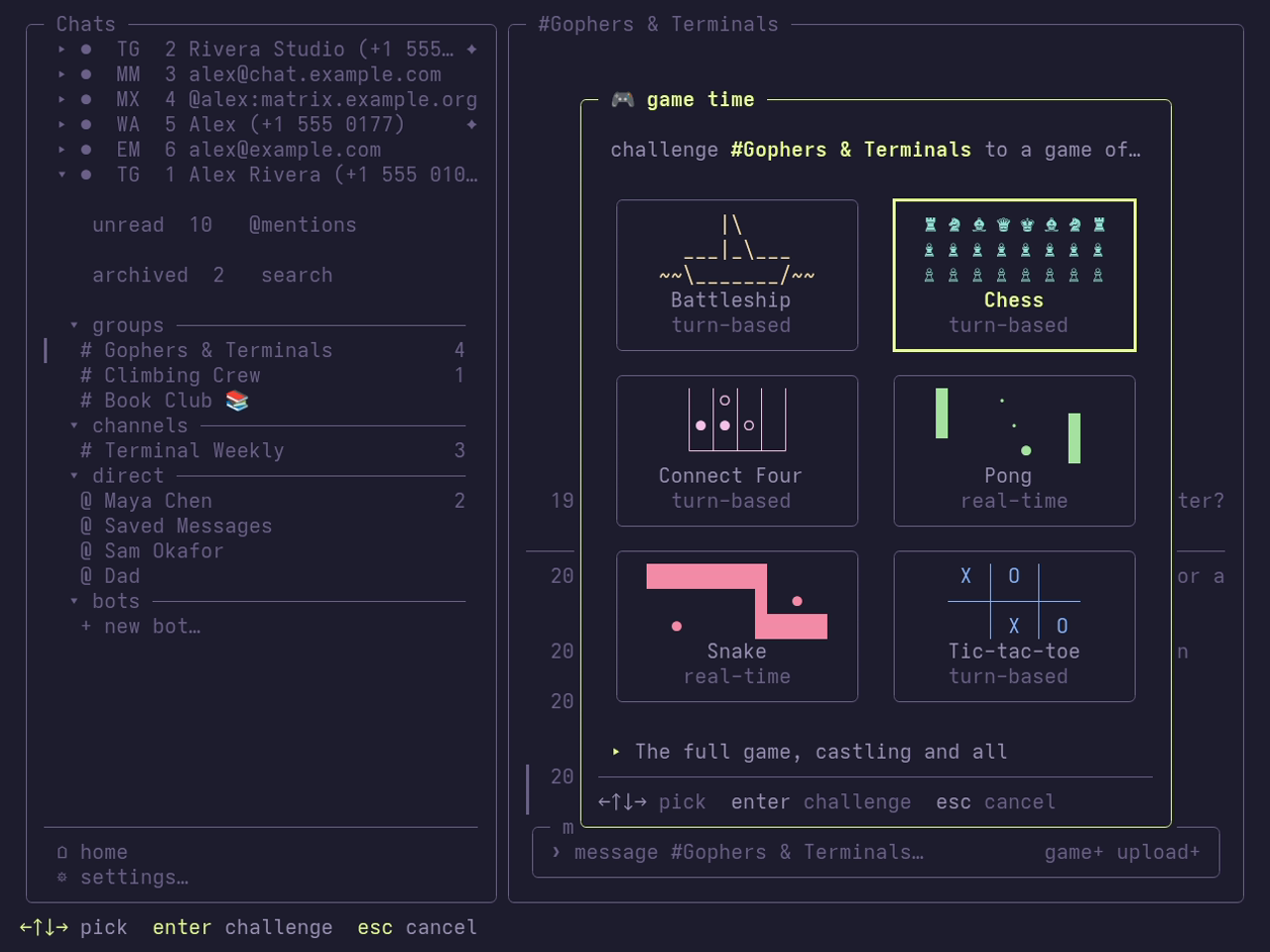
Wiregram opens a tunnel and sends the chat an invite:
🎮 Pong challenge · wiregame://…trycloudflare.com/…Whoever clicks the invite in their wiregram joins, and the game opens beside the chat for both of you. In a group the first to click plays; anyone after is told the game has started.
Each game lists its keys under the board. Tab moves between the sidebar, the chat and the game, and a click on the pane gives it the keys. Esc leaves; while a game is being played it asks first, and the other player is told you left. Leaving the chat keeps the game going (the footer says where it is), so you can come back to it; leaving the account's screen ends it. One game runs at a time.
An invite is good for 10 minutes and for one player. Bots never answer invites. When something goes wrong (cloudflared missing, a tunnel that won't open, an invite that has expired or been taken) an alert says so over the screen; any key or click closes it.
Without a chat
wiregram game plays the same games from the command line, with no account needed:
wiregram game                      # pick a game and host it
wiregram game wiregame://…/…       # join the game an invite links to
wiregram game -name ada …          # the name the other player sees ($USER by default)
Hosting shows the invite link (wiregame://…trycloudflare.com/…) and copies it to the clipboard; send it to the other player however you like. They join with wiregram game LINK, or with a click on it in a wiregram chat. The game fills the terminal; Esc or Ctrl+C leaves (asking first while it is being played) and quits.
What it needs
Only the challenger needs cloudflared installed and on the PATH. The player who joins needs only wiregram.
The challenger's wiregram runs the game for both players on a server that listens only on 127.0.0.1, and starts a cloudflared quick tunnel to it: a random trycloudflare.com address with no Cloudflare account and no incoming connections, so no firewall or router needs opening. The player who joins connects to that address over HTTPS and sends only key presses; the board comes back as text. Wiregram stops cloudflared when the game ends.
Some things to know:
- Cloudflare sees the game. The tunnel's TLS ends at Cloudflare, so it can see the moves and the invite's token. Nothing else of yours goes through it.
- Anyone who sees the invite can join. The invite holds a one-time secret; whoever clicks first with it plays. On servers whose admins can read your chats, they can see it too.
- Fast games lag a little for the guest. Each key goes to Cloudflare and back. Turn-based games don't notice; in Pong and Snake the player who joined feels it.
- A new tunnel takes a few seconds. The pane says opening a tunnel… until it is ready; joining retries for a few seconds while its address spreads.
- Quick tunnels are offered by Cloudflare for testing, without guarantees. If
~/.cloudflared/config.yamlexists, cloudflared may refuse to open one; an alert says why.
Writing a game
Games are Lua 5.1 scripts in internal/game/scripts/, embedded in the binary. Adding a .lua file there adds the game. The challenger's wiregram runs the script for both seats; the other player's wiregram never runs it, so scripts do no networking and do not know which seat is local.
game = {
  info = {
    id = "tictactoe",        -- stable id
    name = "Tic-tac-toe",
    desc = "Three in a row", -- one line in the picker
    help = "arrows move · enter places your mark", -- shown under the board
    players = 2,             -- always 2
    min_w = 21, min_h = 11,  -- the board's size in cells (at most 120×60)
    tick_ms = 0,             -- 0 for turn-based, else 16 or more
    icon = " X │ O │   \n───┼───┼───\n   │ X │ O ", -- optional: the picker's
                             -- drawing, up to 3 lines of 15 cells
    palette = { x = "#ff875f", o = "#5fafff", grid = "dim" }, -- optional; see Colours
  },
}

function game.init(names) end              -- names[1] is seat 1 (the challenger)
function game.key(seat, key) end           -- BubbleTea key: "up", "enter", "space", "a"…
function game.tick() end                   -- every tick_ms; needed only when tick_ms > 0
function game.view(seat, w, h)             -- w, h are min_w, min_h
  return board, status                     -- board is lines joined by "\n"
end
function game.over() return false end
function game.result(seat)                 -- optional; once over:
  return "win"                             -- "win", "lose" or "draw"
end
view is called for both seats after every key and tick, so keep it cheap.
Colours
A script never writes escape codes: control characters are dropped on both sides. Instead it names its colours in info.palette, up to 16, and marks up view's board and status with them:
return "{grid}│{/} {x}X{/} {grid}│{/}", "your turn ({x}X{/})"{name} switches to the palette's colour for name and {/} switches back; a backslash keeps the { or \ after it as written, and a tag the palette lacks shows as written. Names are 1 to 16 of a–z, 0–9 and _, starting with a letter. A colour is #rrggbb, a fixed green, yellow, red, blue or violet, or the theme's accent, subtle or dim, which follow each player's own theme. A colour after on (dark = "on #80633f") is a background instead, so a background tag and a colour tag can be combined: {dark}{w} ♞ {/}. {/} and the end of each line clear both. Tags take no room: min_w counts only what shows. The palette reaches the other player with the game, and each wiregram draws the colours itself, so nothing the script returns reaches the terminal as written. Player names reach init with their { and \ escaped, so they show as written too. Only the base, table, string and math libraries are loaded, with no way to load more code, and every call into the script has 50 ms; a call that takes longer, or raises an error, ends the game and says why in an alert.